
Anti-Forensics 101: File Timestamp Manipulation
Fri, Mar 6, 2026 • 6 min read
Timestamps are metadata, small pieces of information the operating system attaches to a file to record things like when it was created, opened, or modified.
And those timestamps are incredibly easy to change.
If you open a file’s properties in Windows, you’ll see a few familiar fields: Created, Modified, and Accessed. If a file says it was created in 2019, they assume it must have existed in 2019.
They’re just metadata, records the operating system keeps about a file’s activity. And in many cases, they can be changed.
Most of the time Investigators don’t rely on a single timestamp; they compare multiple time sources across the filesystem and the operating system. When those timelines disagree, it often reveals that something was manipulated.
Understanding how timestamps actually work and how they can be altered is essential for both sides of the field. Attackers use it to hide activity. Investigators use it to detect the hiding attempt. Let's get right into it.
What a Timestamp Actually Is (It’s More Complicated Than You Think)
On Windows systems using NTFS, which is still the main filesystem in most businesses, a file does not have just one timestamp. Instead, it has two separate sets stored in the Master File Table (MFT), and they work in different ways.
$STANDARD_INFORMATION ($SI): This is what you see in Windows Explorer: Last Modified, Last Accessed, and Created. These timestamps appear in most forensic tools and, importantly, any unprivileged user process can change them. No admin rights are needed.
$FILE_NAME ($FN): This second set is stored deeper in the MFT entry and should only be updated by the Windows kernel during real filesystem operations. Attackers rarely change these because most tools do not access them, but trained forensic examiners check them first when they suspect manipulation.
This is the first major trap: if a tool only changes $SI timestamps, it creates a clear inconsistency. The $SI might say the file was created in 2019, while the $FN shows it was created last Tuesday. This mismatch is a major red flag in NTFS forensics, and tools like Autopsy and other commercial triage software highlight it automatically.
The Toolbox and What Each One Actually Does
Windows

Metasploit’s Timestomp is the tool most people mention first, partly because it is part of a well-known framework and has been around long enough to appear in every training course. It modifies $SI attributes cleanly and can remove nanosecond precision (more on that soon). However, by default, it does not change $FN. It is an older tool and that shows.
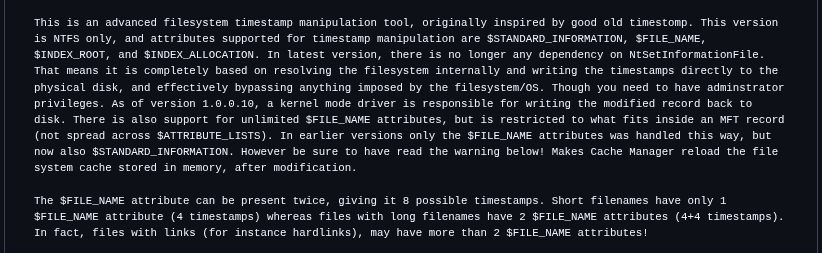
SetMace (GitHub: jschicht/SetMace) is a more forensics-aware tool. It can change both $SI and $FN attributes, a process known as “double timestomping.” For attackers who want a file to appear genuinely old to a skilled examiner, this is a key difference. It is not foolproof, since other MFT artifacts and $LogFile/$USN Journal entries can still reveal manipulation, but it covers the obvious layer that Timestomp misses.
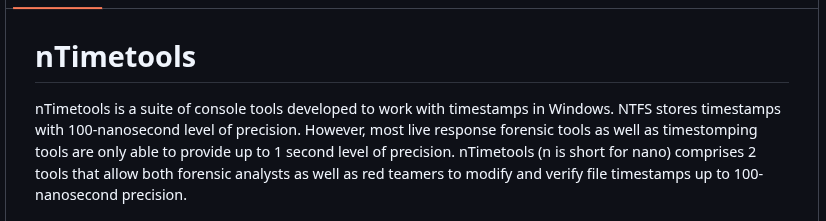
nTimetools / nTimestomp (GitHub: limbenjamin/nTimetools) addresses a subtle but important issue: nanosecond precision. Windows NTFS stores timestamps with 100-nanosecond resolution. Most timestomping tools, including older versions of Timestomp, set the sub-second part to zero. This is easy to spot forensically, since real files almost never have perfectly rounded timestamps. An examiner searching for zero-nanosecond files among thousands of entries will quickly notice your implant. nTimetools allows you to set or randomize nanosecond values to help the file blend in.
PowerShell (native): Sometimes the quietest move is using what’s already there.
(Get-Item "C:\payload.exe").LastWriteTime = "01/01/2020 08:00:00"
This method takes just one line and does not require any external binary. It works on any modern Windows system. The downside is that it operates at the Win32 API layer, so it can only change $SI. Still, for attackers who do not expect a deep forensic investigation, this is often enough.
Built-in to frameworks: Cobalt Strike, Empire, and most mature APT toolkits include timestomping as a post-exploitation module. When you’re reading a threat intel report and it notes that a group “modified file timestamps,” they almost certainly mean automated timestomping baked into the C2 framework.
Linux/Unix: Simpler, But Not Simple
Linux doesn’t have the $SI/$FN dual-attribute complexity. On ext4, the timestamps are: access time (atime), modification time (mtime), change time (ctime), and on newer kernels birth/creation time (crtime).
The touch command handles the first two with zero friction:
touch -a -m -t 202001011200.00 maliciousfile # set access & modify time
touch -r legitimatefile maliciousfile # copy timestamps from a clean file
The second method, copying timestamps from a legitimate system file, is especially effective. Instead of picking a random date that might not fit system patterns, you use the timestamp profile of a file that already looks native. For example, you can drop a backdoor and give it the timestamps of /usr/bin/curl so it blends in with the rest of the filesystem.
The catch: ctime cannot be directly set by userspace tools. Change time updates whenever the file’s metadata changes — including when you run touch. The only reliable ways around it are manipulating the system clock before the operation (clumsy, detectable via NTP log analysis), using raw filesystem tools like debugfs, or running as root with direct inode manipulation. Most automated tools don’t bother, which means ctime is still a frequent tell on Linux.
Cross-Platform: Python Makes It Trivial
import os, timets = time.mktime(time.strptime("2020-01-01 12:00:00", "%Y-%m-%d %H:%M:%S"))os.utime("/path/to/file", (ts, ts))
This method takes just three lines and works anywhere Python is available, which covers most of the internet’s infrastructure. Custom malware droppers often use this logic. The same ctime limitation from Linux applies, but for quick operations in environments where forensic analysis is unlikely, it works well.
The Counterintuitive Insight Most People Miss
Here it is: timestomping can make forensic analysis easier for an investigator if done clumsily.
A file that appears to be perfectly timestomped, showing a creation date from 2015 but appearing in the MFT sequence after files from 2023, is actually more suspicious than not timestomping at all. The MFT assigns sequence numbers in order. If a “2015” file has a sequence number between files from last week, this is a contradiction that timestamp changes cannot hide, since MFT record numbers show allocation order, not timestamps.
Similarly, prefetch files, event logs, USN journal entries, Shimcache, and Amcache each record their own version of when something happened. If you timestomp only one layer and leave the others unchanged, you do not hide the file it makes it stand out.
The Real Lesson
Timestamp manipulation is one of the oldest tricks in post-exploitation because it takes advantage of a common bias: people trust metadata more than they should. When we see “Created: January 1, 2020,” we tend to think of the file as old, harmless, and unrelated to the incident.
The best anti-forensics does not erase evidence. Instead, it creates evidence that seems believable. The best forensic work does not just look for evidence, but checks for consistency across all evidence.
Anyone can change a timestamp. Very few can change everything that remembers it.